
How to write Javascript in ES6 with Nodejs

You building an application with React and Node. You write your React code in ES6 but when you visit your Node backend code you happen to write in ES5. I found this quite annoying due to the change and also the require method. If you feel you are comfortable writing ES5 Node, you can skip this blog but if you might like making your frontend and backend switch quite seamless as we wait to figure out deno, you are in luck, because I will guide you in all the steps you will have to undertake and I have an existing NodeJS ES6 template setup already on Github.
Prerequisites
- Basic knowledge of writing JS in ES6 standard
- Basic expressjs concepts
Let's get started
The usual stuff, create a new folder to house our code and change directory to the folder.
$ mkdir node_api_es6_template && cd $_
Create a package.json file to track our dependencies
$ yarn init -y
// or
$ npm init -y
Use whichever command, you feel comfortable with but throughout this project I will use yarn, I always feel its like npm but on steroids.
We will have to install a couple of babel packages to transpile our ES6 code to ES5
$ yarn add babel-core babel-eslint babel-plugin-transform-runtime babel-preset-es2015 babel-preset-stage-1 babel-register
We will create a .babelrc file that holds certain babel configurations. These configurations instruct babel to transpile to a specific ECMAScript standard.
$ touch .babelrc
Let's add some JSON inside the file, stating all configs.
{
    "presets": [
        "es2015",
        "stage-1"
    ],
    "plugins": [
        "transform-runtime"
    ]
}
We will have to edit the package.json file, especially the script key(defines a set of node scripts you can run).
{
  "name": "nodejs_blockchain_app",
  "version": "1.0.0",
  "main": "src",
  "scripts": {
    "test": "./node_modules/.bin/mocha --require @babel/register",
    "start": "node .",
    "dev": "nodemon -i \"*.test.js\" .",
  },
  "author": "wachira",
  "license": "MIT",
  "dependencies": {
    "babel-core": "^6.26.3",
    "babel-eslint": "^10.0.3",
    "babel-plugin-transform-runtime": "^6.23.0",
    "babel-preset-es2015": "^6.24.1",
    "babel-preset-stage-1": "^6.24.1",
    "babel-register": "^6.26.0",
  }
}
- The
testcommand will enable one to run tests written in ES6 standard startwill enable one to be able to run the server in production modedevwill enable one to run the server in development mode usingnodemonCLI tool.
We will install a couple of packages to have a whole node/express server running perfectly.
$ yarn add express body-parser chalk
expressis a minimal and flexible Node.js web application framework that provides a robust set of features for web and mobile applications. It will enable us to spin up a web server faster.body-parseris a Node.js body parsing middleware. When you decide to work on a full CRUD API, this will come in handy.chalkhelps with colorful Nodejs logs
Let's get coding
We will create an src folder to house all of our Node API code.
$ mkdir src
Inside we will create two files one to house our server code and the other to transpile our ES6 code.
touch app.js && touch index.js
Open src/app.js file with your favorite editor and let's add some code
"use strict";

import express from "express";
import bodyParser from "body-parser";
import cors from "cors";
import dotenv from "dotenv";
import chalk from "chalk";

const app = express();

// Configure Dotenv to read environment variables from .env file
// automatically
dotenv.config();

// Define json body reader
app.use(bodyParser.json());
app.use(bodyParser.urlencoded({ extended: true }));

app.use(express.static(__dirname, { dotfiles: "allow" }));

// Enable proxy x-Forwadded-*
app.enable("trust proxy");

// Enables CORS
app.use(cors());

// Set port
app.set("port", process.env.PORT || 5000);

// Initialize server
app.listen(app.get("port"), err => {
  if (err) {
    console.log(chalk.red(err.message));
  } else {
    console.log(chalk.green(`Server is running on port ${app.get('port')}`));
  }
});
Next, open the src/index.js and add two lines of code
// Imports the babel library to transpile our code
require("babel-core/register")

// Import our server code
exports = module.exports = require("./app")
After you have added your code, let's spin up our express server
$ yarn dev
// or
$ yarn start
You should see a green log on your console
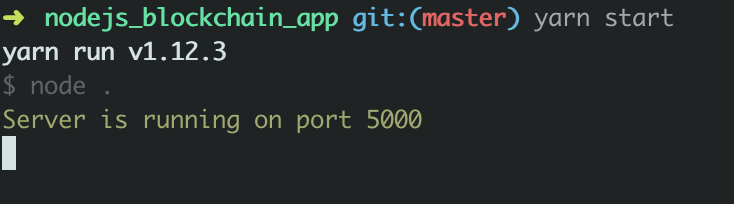
else you should receive a red log on your console with a descriptive error message.
That's it
Extras
If you happen to have a problem with the setup, clone my repo and check where you went wrong.
Comments
Join the discussionFor an up-to-date overview of the ES6 (a.k.a. ES2015) support of nodejs please take a look at: https://node.green/. As you can see almost all ES6 language features have been available for quite a while.
Nodejs wraps a recent version of V8, the JavaScript engine of Chrome. So any ES6 feature Chrome supports, nodejs supports a well. Except for one...
The only real difference with "browser-ES6" is the module system. Instead of import you need to write require.


